
Help
Everything you need to get started with EZ Sheets.
How to create a CSV file
Most EZ Sheets tools accept a CSV file as input. A CSV (Comma Separated Values) file is a plain text file where each row contains one item.
To create one from a spreadsheet program like Google Sheets or Microsoft Excel:
- Open your spreadsheet and enter your words or data — one item per row.
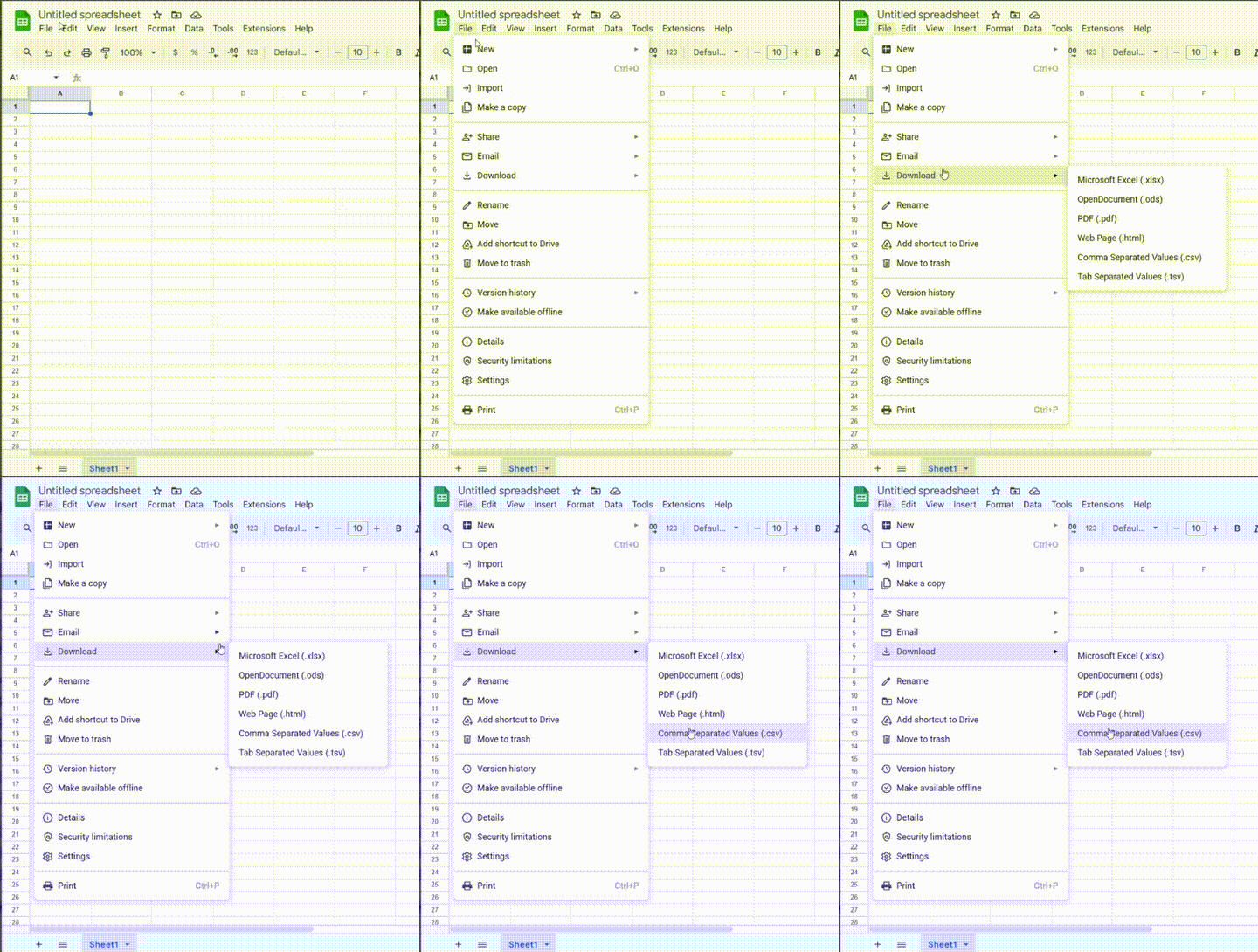
- Go to File → Download (Google Sheets) or File → Save As (Excel).
- Choose Comma Separated Values (.csv) as the file format.
- Save the file to your computer.
- Upload it to the tool of your choice.
How to save your spreadsheet as a CSV on desktop or laptop.
Note: Most tools accept one word per line. The Crossword tool requires two columns — Answer and Clue. The Word Scramble tool accepts an optional clue after a comma on each row.
Frequently Asked Questions
How do I create a CSV file for EZ Sheets?
Open a spreadsheet program like Google Sheets or Microsoft Excel. For Guessly, Vocabulary, and Word Bingo, enter one word per row in column A. For the Crossword, Word Search, Word Matching, and Word Scramble tools, use two columns: the answer in column A and an optional clue in column B. Rows where column B is empty but column A is not will be skipped. Go to File → Download (Google Sheets) or File → Save As (Excel), choose Comma Separated Values (.csv), and upload the saved file to any EZ Sheets tool.
Is EZ Sheets free to use?
Yes, EZ Sheets is completely free. No login, no subscription, and no data is stored. Everything runs directly in your browser.
What tools does EZ Sheets offer?
EZ Sheets offers printable puzzle generators including Crossword, Word Search, Sudoku, Word Bingo, Word Scramble, and Vocabulary worksheets. It also includes Math Drill sheets, the One Shot multi-activity bundle, classroom games (Guessly and Tic-Tac-Toe), and interactive science tools (Solar System and Periodic Table).
Do I need to create an account?
No account is required. Just open the tool, upload your word list, and generate your puzzle or worksheet instantly.
What is the One Shot feature?
One Shot generates a complete multi-activity PDF bundle from a single word list — including a word search, crossword, word matching, and word scramble — all in one export.